Every AI app eventually has a request that takes minutes, not milliseconds. Here is a simple pattern for it, what it costs you, and how to know when it is time to move on.
Most AI demos hide a small lie. You click a button, a spinner appears, and a few seconds later something clever shows up. It works because the demo is fast.
Real AI work is rarely fast. Explore a website, call a model, generate narration, render a file, call another model to check the result. Add those up and you are looking at one to five minutes, which is far longer than any HTTP request should stay open.
I ran into this recently while building a side project that turns a product walk-through into a narrated demo. The details of the project don’t matter here. The problem does, because I suspect you will meet it too: how do you run long, multi-step AI work behind a web API and keep the user informed while it runs?
This post covers the simplest pattern that works, what it honestly costs you, and a neutral way to decide when you have outgrown it.
Why a Plain Request/Response Falls Over
A synchronous endpoint that does all the work has three problems:
- Timeouts: Browsers, gateways and load balancers all have their own idea of “too long”. Azure Container Apps ingress, for example, has a request timeout you will eventually hit.
- No Feedback: The user sees a spinner and has no idea whether step 2 of 5 is running or the server has quietly died.
- Fragile connections: A refresh or a flaky network drops the connection, and the work is lost or orphaned.
The fix is to stop treating the work as part of the request. The request starts the work, and something else reports on it.
The Pattern in One Picture
The shape is: accept, hand back an id, work in the background, stream progress.
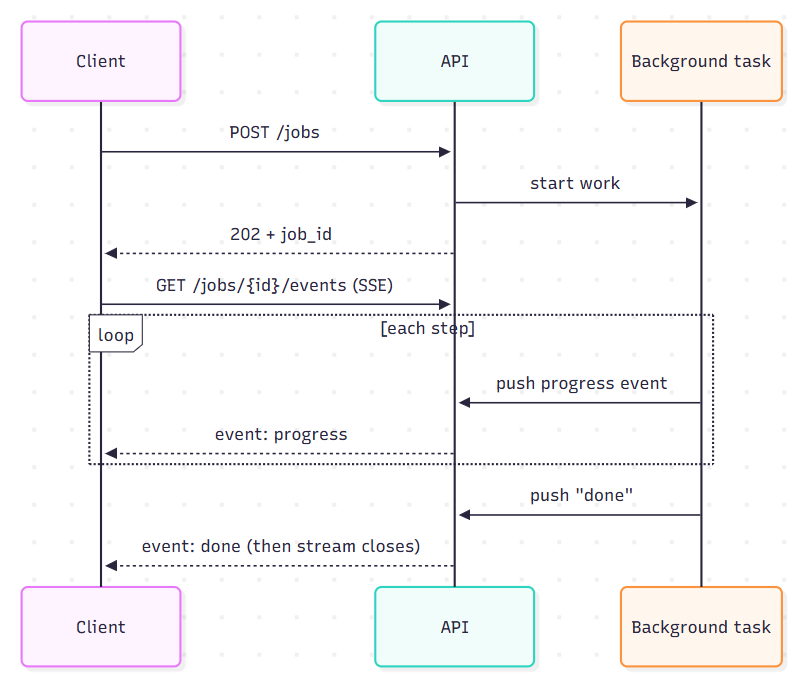
Four small pieces make this work.
1. A job object that owns its own event queue
Each job carries its state and a queue that the worker writes to and the stream reads from.
2. An endpoint that starts the work and returns straight away
3. A worker that keeps blocking work off the event loop
AI pipelines mix sync calls with blocking ones (file work, CPU-heavy rendering, SDKs that are not sync). Blocking the event loop freezes every other request, so push those calls to a thread.
4. A stream that sends the current state first, then follows the queue
Sending a snapshot first means a client that connects late (or reconnects) still knows where things stand.
That is the whole idea. Server-Sent Events (SSE) suit this well because progress is one-directional (server to client), they work over plain HTTP, and the browser’s `EventSource` handles basic re-connection for you.
What This Pattern Costs You
This is where honesty matters. The pattern is small precisely because it leaves things out. Here is what you are signing up for.
- Jobs live in memory – If the process restarts or a new version deploys, running jobs disappear. A finished job’s status is lost too unless you persist it.
- One instance only – The job dictionary belongs to one process. If a second replica handles the `GET`, it has never heard of the job. Running a single replica avoids that, but it also caps your scale.
- No retries – If a step fails halfway, nothing resumes it automatically. You decide whether to start over.
- One reader per stream – In the sketch above, the queue is drained by whoever reads it. Two browser tabs watching the same job will split the events between them. Fixing that means broadcasting instead of a single queue.
- No back-pressure or scheduling – Ten jobs at once all start at once. Nothing limits them unless you add a limit yourself.
None of this makes the pattern wrong. It makes it a choice with a known boundary. For an MVP, an internal tool, or a low-volume app, those costs may well be acceptable, and what you get back is a design you can read in one sitting.
When Do You Outgrow It?
I don’t think there is one right answer here, and architecture is opinionated enough already. So instead of recommending a tool, here is a way to ask the questions.
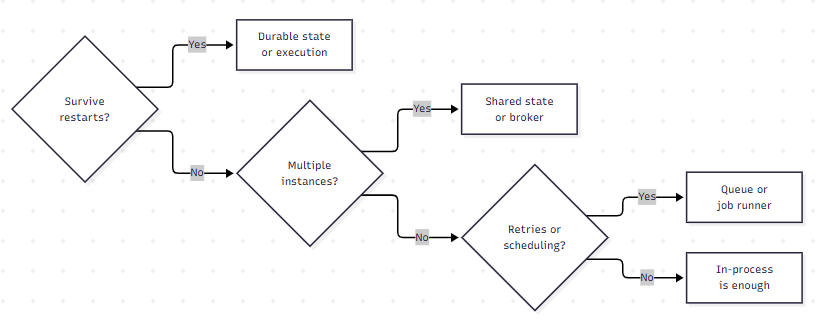
A few examples of what those categories can look like in the Azure world, offered as options and not rankings:
- Durable execution such as Durable Functions or a workflow engine, when jobs must survive restarts and resume.
- A message broker such as Azure Service Bus or Storage Queues, when you need multiple instances or reliable hand-off.
- A job runner such as Azure Container Apps jobs, when work is better run as its own isolated process.
Any of these can be the right call. What matters is that you pick one because a specific signal told you to, not because “that’s what production looks like”.
Signals It Is Time to Revisit Your Design
Before you add infrastructure, check whether you are actually seeing any of these:
- Users have lost work because of a deployment or restart.
- You need a second replica for load or availability.
- Failures need automatic retry, or you need to resume rather than restart.
- Several jobs at once are starving each other of CPU, memory, or model rate limits.
- Different people need to watch the same job at the same time.
- You are starting to build your own retry logic, persistence, or scheduling inside the worker.
That last one is a good smell test. When you catch yourself re-implementing a queue inside your app, you have probably found your answer.
Closing Thoughts
Start with the simplest thing that is honest about its limits, and know the signals that tell you to stop. The in-process pattern is not a shortcut around good architecture. It is a deliberate first step that you take with your eyes open.
If you have solved this differently, or hit a limit I haven’t mentioned, I would genuinely like to hear about it in the comments.